
Figma pluginReview in Figma
Review in Figma
Review selected frames against your brand kit without leaving the file.
The RepliKit Figma plugin has a Review tab. You select frames on the canvas, and Kitana reviews them in place. The plugin shows the score and the findings. The full report opens in Kitana Lite on the web.
You can find the plugin at replikit.ai/product/figma-plugin.
Before you start
You need a brand kit. If you have none, the tab says You need a brand kit before you can review anything. Select Create one in Kitana to make one on the web. See Brand kits.
Run a review
- Open the RepliKit plugin and go to the Review tab.
- Select one or more frames on the canvas.
- Under Brand kit, choose the kit to review against. The plugin remembers your choice for this file. If you have only one kit, it is chosen for you.
- Select Review. The button shows how many frames you selected.
The plugin shows its progress: it exports the frames, uploads them, then reviews them.
One review takes up to 10 frames. If you select more than 10, the plugin tells you that the first 10 will be reviewed.
Read the result
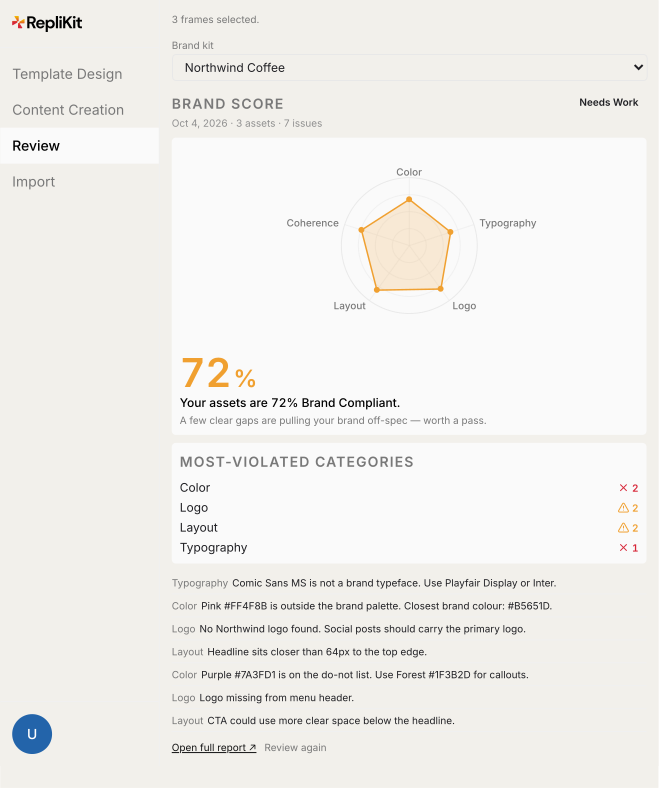
The result shows the score, the categories and the findings for the frames you sent. Kitana uses the same score bands as the web. See Reading a review.
- Select Open full report to see the whole report in Kitana Lite.
- Select Review again to start a new review.
Every review from the plugin is also saved in your review history.
If the review does not run
- Out of credits. The plugin shows a Top up credits link. See Credits.
- Another review is running. The plugin says another review is running on this account. It frees up when that review finishes.
Archived brand kits are not offered in the plugin.